Guide
What is GPS fleet tracking?
How a small tracker in each vehicle shows where your fleet is, how it’s being driven and what it costs to run, and how to choose a system, even for a handful of vans.
 By Brendan Mease, Founder & CEO ·
The short answer
GPS fleet tracking uses a small GPS tracker in each vehicle to send its location, speed and engine data to online software over the cellular network. Fleet managers see every vehicle on a live map, review past trips, and get alerts about risky driving, idling and vehicle problems, from a computer or a phone.
- A tracker plugs into each vehicle’s diagnostic port, connects to a heavy truck’s port, or is hardwired.
- It reports location, trips, speed, idling, harsh driving and engine alerts as you drive.
- Fleets use it to answer customers, coach safer driving, cut fuel costs and stop misuse.
- It works for fleets of every size, including small businesses with a few vans.
- Costs come from hardware, a monthly service fee per vehicle and installation, so compare all three.
What is GPS fleet tracking?
GPS fleet tracking is a way to see where your company vehicles are and how they’re being used, without calling every driver. A tracker in each vehicle works out its position from GPS satellites and sends it, along with data read from the vehicle itself, to software you open in a browser or a phone app.
You’ll also hear it called vehicle tracking, fleet telematics or fleet management software. They overlap: GPS tracking is the location part, telematics is the wider idea of sending vehicle data over a wireless network, and fleet management software is what you use to act on it.
How does GPS fleet tracking work?
- GPS finds the vehicle. The tracker receives signals from GPS satellites and calculates its position.
- The tracker reads the vehicle. Plugged into the vehicle’s diagnostic port, it also reads speed, mileage, engine alerts and more from the vehicle’s own computer. It only reads data; it doesn’t change anything.
- The data goes over the cellular network. A built-in cellular connection sends each update to the tracking company’s servers as the vehicle drives.
- You see it in the software. The web and mobile apps turn those updates into a live map, trip histories, reports and alerts.
What can GPS fleet tracking show you?
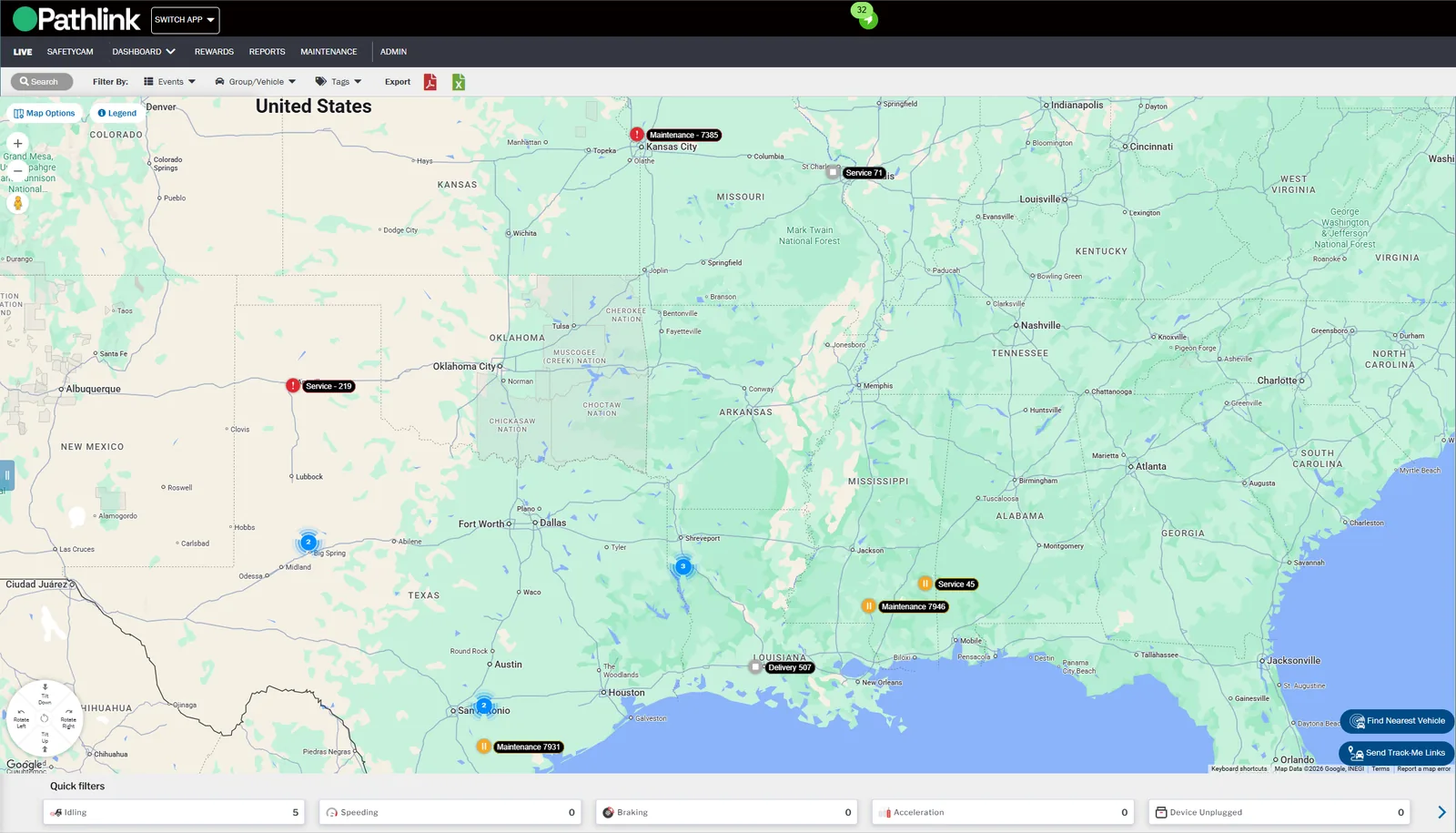
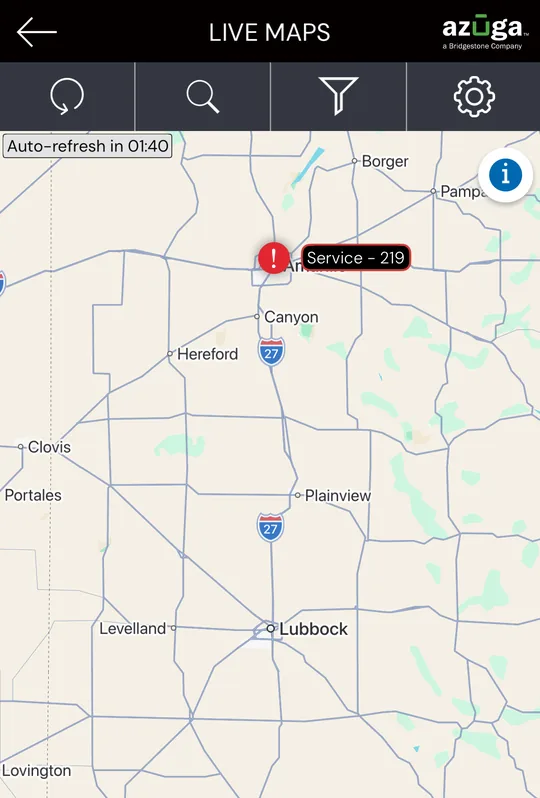
- Live location of every vehicle
- Trip history, stop by stop
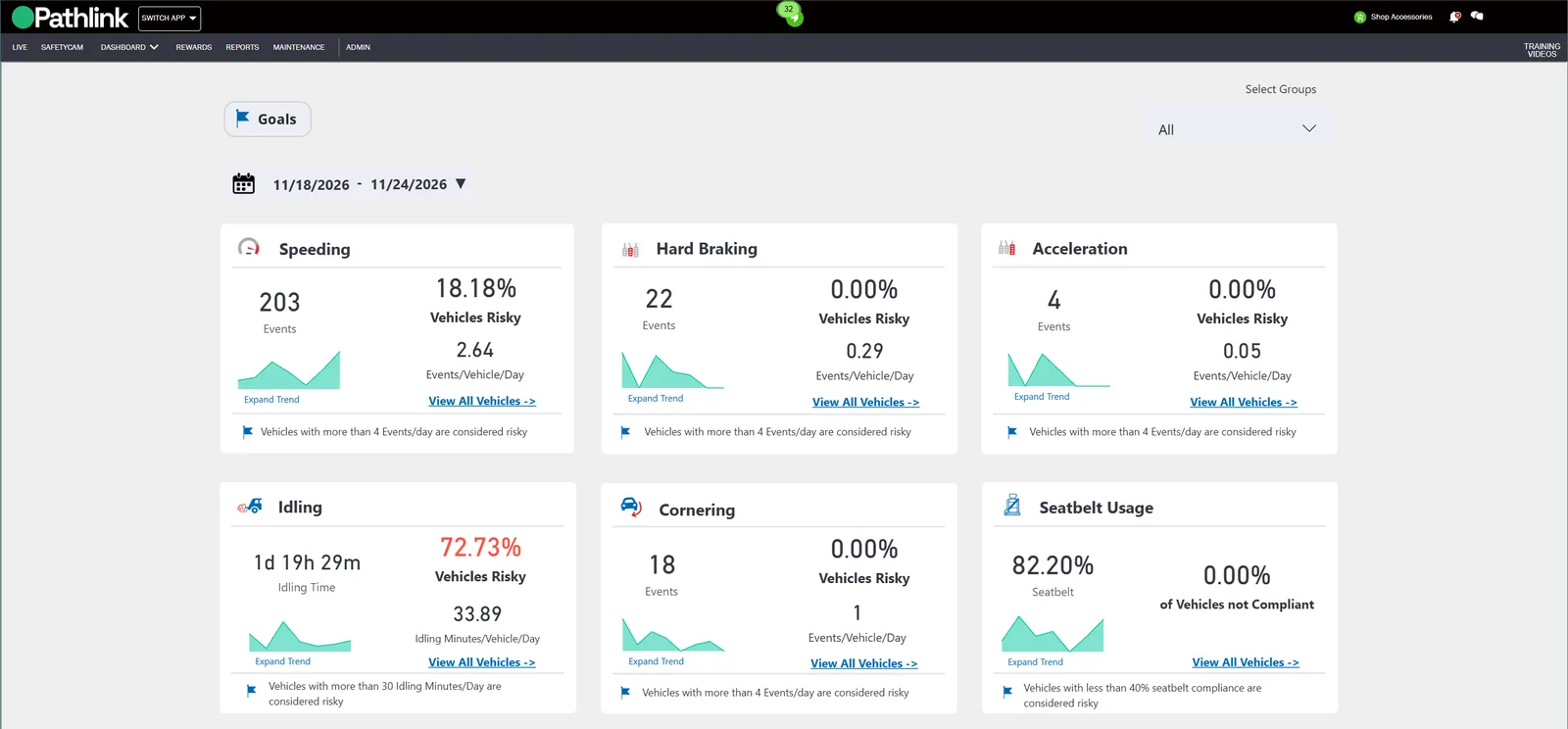
- Speed and speeding
- Idling time
- Hard braking and acceleration
- Harsh cornering
- Seat belt use
- Odometer and engine hours
- Engine and warning-light alerts
- Fuel use
- Tire pressure
- Arrivals and departures, with geofences
What a tracker can read depends on the vehicle. Seat belt, fuel and tire pressure data aren’t shared by every make and model.
Types of GPS trackers
| Type | How it connects | Best for |
|---|---|---|
| Plug-in (OBD-II) | Plugs into the diagnostic port under the dash, found on most vehicles built since 1996 | Cars, vans and pickups; quick installs |
| Heavy-duty (JBUS) | Connects to a medium or heavy truck’s diagnostic port with an adapter cable | Box trucks, tractors and other heavy trucks |
| Hardwired | Wired into the vehicle’s power, ignition and ground | A permanent, tamper-resistant install |
| Battery-powered | No wiring; a built-in battery lasts years | Trailers, containers and equipment |
| Bluetooth tags | Picked up by a nearby powered tracker | Tools and small equipment |
Benefits of GPS fleet tracking
- Faster answers for customers. Know exactly where a tech is when a customer calls, and send the closest one to urgent jobs.
- Safer driving. Driving scores show who speeds, brakes hard or skips the seat belt, so you can coach them. A safer record is what insurers reward.
- Lower fuel costs. Idling reports and fuel card matching show where fuel is wasted. More on fuel management.
- Fewer breakdowns. Engine alerts and maintenance reminders by mileage or engine hours catch problems early.
- Accurate hours and billing. Trip and stop records back up timesheets and invoices.
- Theft and misuse alerts. Know when a vehicle moves after hours or leaves where it should be.
- Compliance. Trucks that need electronic logs can run an ELD on the same platform.
Who uses GPS fleet tracking?
Any business with vehicles on the road, from a two-van plumbing company to a trucking carrier:
- Field service & trades
- HVAC
- Plumbing
- Electrical contractors
- Pest control
- Landscaping
- Construction
- Trucking & logistics
- Delivery & distribution
GPS fleet tracking for small businesses
Small fleets often get the most out of tracking, because one owner or office manager is juggling dispatch, customers and payroll at once. With five vans, one avoided breakdown, one settled dispute or a few hours of overtime saved can make a noticeable difference.
What matters most for a small fleet:
- Freedom to leave. Many providers lock you into multi-year contracts with steep fees to cancel. Look for terms you can cancel anytime, ideally with a locked-in price.
- Easy to use. You won’t have a fleet manager on staff, so the map and alerts should make sense on day one, including on your phone.
- Real support. When something’s off, you want a person who answers, not a ticket queue.
- Room to grow. The same system should add dash cams, equipment trackers or ELDs when you need them.
How much does GPS fleet tracking cost?
Pricing has three parts, and comparing quotes means comparing all three:
- Hardware: the tracker itself. Some providers charge up front, others include it in the monthly fee.
- Monthly service: a fee per vehicle for the cellular connection and software. Add-ons like dash cams or ELDs cost more.
- Installation: free for some plug-in trackers you install yourself, or a fee for a technician, especially for hardwired installs and cameras.
Also check the contract length and any cancellation fees, which can cost more than everything else combined if you need to leave. Pathlink locks your price for three years, lets you cancel anytime with no fees, and installs at a fixed price you know up front. Get a quote for your fleet.
What to look for in a GPS fleet tracking system
- Works with your vehicles: cars, vans, heavy trucks and equipment on one map.
- A clear mobile app: most owners check the fleet from their phone.
- Driver safety tools: driving scores and, ideally, AI dash cams on the same platform.
- Integrations: connects to the software you already use, like your field service software or fuel cards. See Pathlink’s 80 integrations.
- Reports you’ll actually use: trips, stops, idling, mileage and fuel, scheduled to your inbox.
- Fair terms and real support: no lock-in, and people who pick up the phone.
Getting drivers on board
Drivers sometimes worry tracking means being watched all day. Be upfront: explain that it tracks company vehicles during work, what you’ll look at, and how it helps them. Trip records and video protect good drivers from false claims and customer disputes, and driving scores can feed a rewards program. Fleets that explain the why usually find drivers come around quickly.
How to get started
- List your vehicles and equipment. Year, make and model for each, plus any trailers or machines you want to track.
- Decide what you need. Location only, or dash cams, ELDs and equipment tracking too.
- Get a quote. Compare hardware, monthly fees, installation and contract terms.
- Install and set up. Add your drivers, groups, alerts and geofences.
- Review weekly. Check the safety and idling reports, and act on what you find.